Project overview
The WorkforceHub Dashboard is the role-based home screen for Swipeclock's WorkforceHub platform. Managers, admins, and employees each land on a view tailored to their role and permission. Instead of hunting across modules, they can see approvals, punch status, schedule, hours, and more, all in one place.
Unlike my downloadable plugins and apps, this is a product I worked on professionally for Swipeclock. This page is a portfolio case study of the work I did on the backend for this project: a C# .NET Core API that powers the data displayed in those widgets.
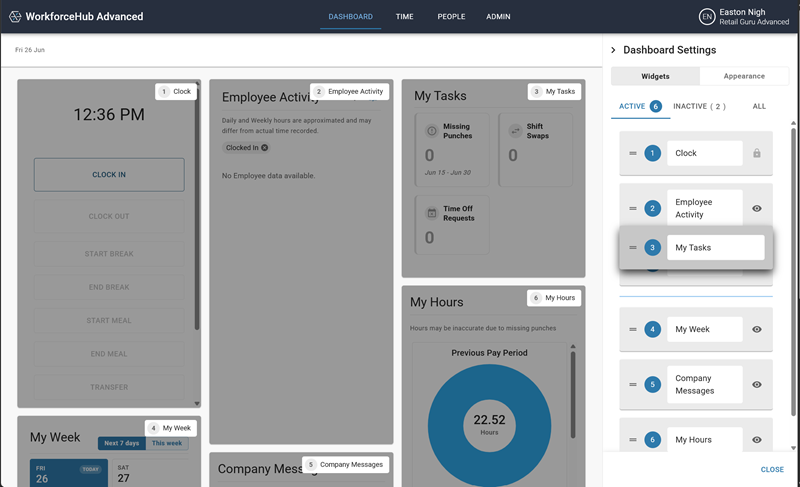
Dashboard Settings - users can show/hide widgets, reorder them, and pick a layout (preferences are stored client-side).
What the API enables
High-level outcomes of the backend work - framed around user-facing value, not internal design docs.
Multi-service aggregation
Chains timekeeping, scheduling, and related services so the dashboard can show one coherent view without the client calling each system separately.
Role-aware payloads
Managers, admins, and employees receive data shaped for how they actually work from the first login.
Permission-gated data
Responses respect not only role defaults, but also what the individual employee is allowed to see.
At-a-glance data
Punch status, tasks, hours, schedule, messages, and clock-related information are available for the UI to render in one place.
WorkforceHub integration
Fits into existing Time & Attendance and scheduling surfaces so the dashboard stays consistent with the rest of the product.
Display-focused API
Owns the data path for what appears on screen. Client-side preferences (layout, show/hide, order) stay in the browser.
Product features at a glance
Screenshots of the WorkforceHub Dashboard.
Resources
Check out the following pages at Swipeclock that explain more about the Dashboard and what it has to offer!